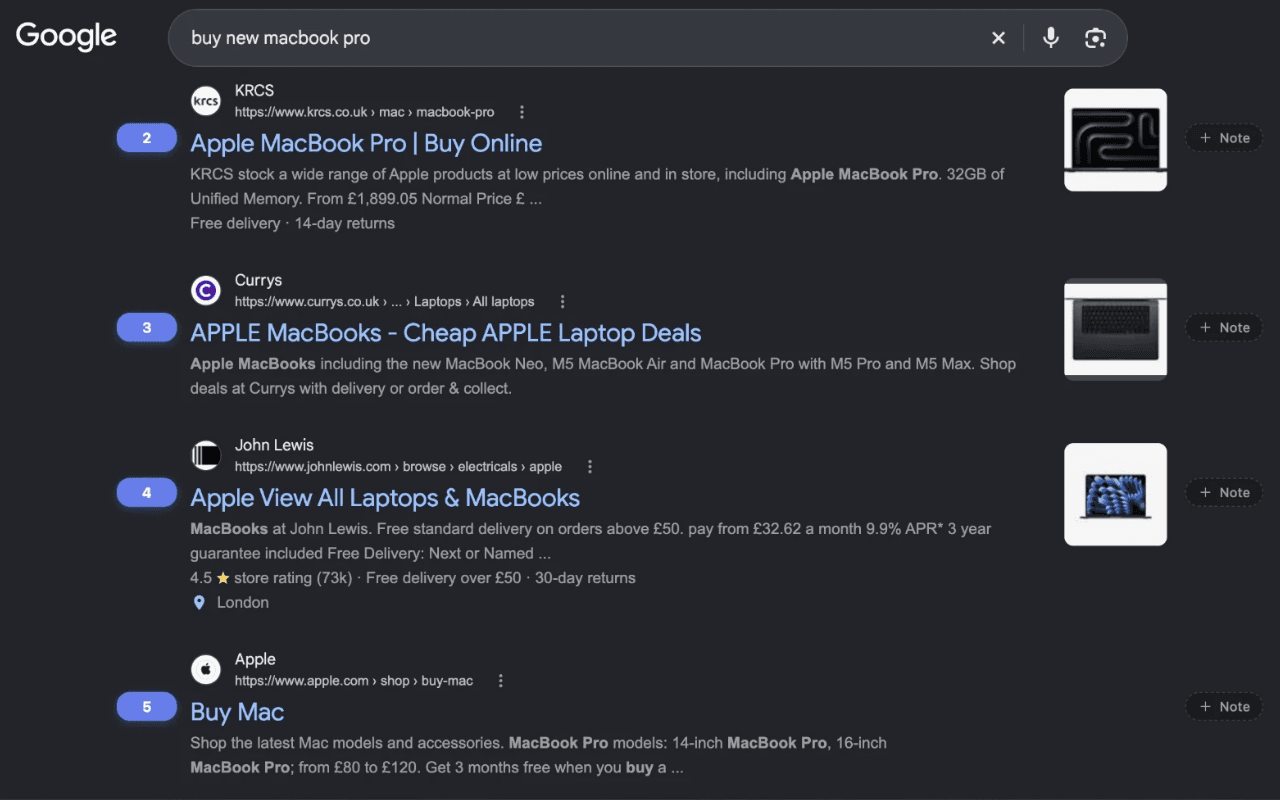
Rung SERP Counter (formerly SERP Counter + Notes) is a free Chrome extension that shows the real organic position of every result on a Google search page. It numbers results across the entire paginated SERP, not only the top 10, and it counts organic results only: ads and SERP blocks such as Products and People Also Ask are skipped.
On top of that, you can pin a note to any URL or to a whole domain, and the note stays next to that result every time you run into it again.
Why I built it
I built it because I was tired of two things:
Working out a site's real organic position while Google mixes ads and SERP blocks into the page.
Losing track of what I had already checked while reviewing competitors.
The second one is why notes exist, and I can't imagine doing competitor analysis without them anymore.
What Rung does
Numbers every organic result. A badge to the left of each result shows its position, and the numbering continues from page to page, so page 3 picks up where page 2 ended.
Skips what is not organic. Ads and SERP modules (Products, People Also Ask and similar) are not counted. Rung recognises them by the structure of the page, not by visible words, so it works on every Google locale.
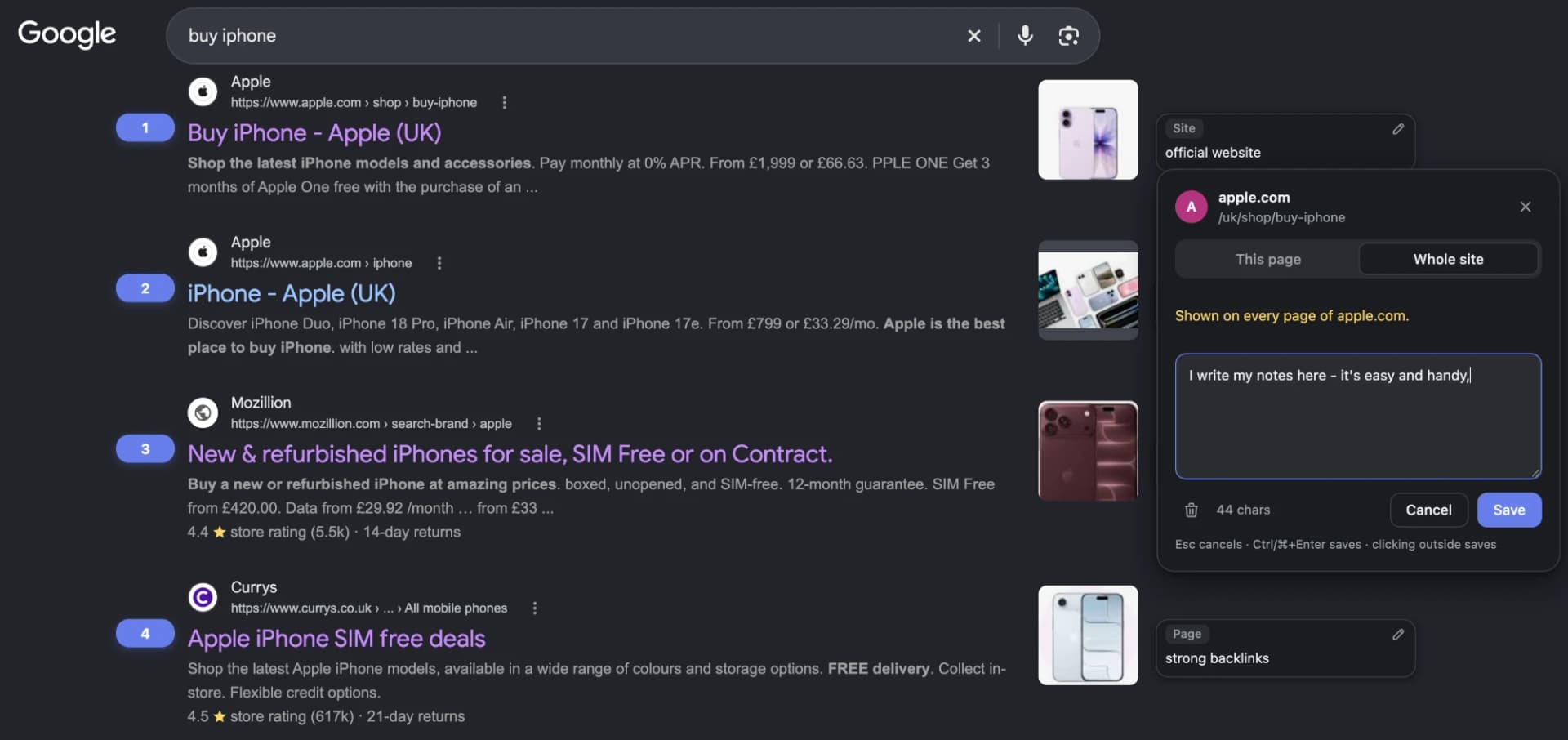
Keeps notes for a URL or a whole domain. Write what stands out about a result and choose whether the note belongs to that exact page or to the entire site. It shows up next to the result whenever it appears again.
Lets you set the colours. Click a badge to choose one of 12 presets (all with enough contrast to pass WCAG AA) or set your own, with a live preview. The interface follows Google's light or dark theme.
Has a toolbar popup. Switch Numbering and Notes on or off for all open tabs, pick the badge colour, and export or import your notes as a JSON file.
Stays out of the way. Badges and notes sit on two straight lines beside the results and the page layout is never shifted. If there is no room (a narrow window, a knowledge panel), a note shrinks to a chip or an icon.
Works signed out and in incognito. Allow it in incognito in the extension settings first.
How I use notes
Notes are my checkpoints: backlinks, redirects, content changes, anything I don't want to re-audit from scratch. A short note like "301 from the old domain, links from 3 guest posts, H1 rewritten" is enough to remember what I already checked the next time that site shows up for a different query.
Because a note can belong to a whole domain, one note about a competitor follows it through every query you research.
How to start
Install Rung from the Chrome Web Store. It also runs in other Chromium browsers such as Edge, Opera, Brave and Vivaldi.
Search on Google. Position badges appear next to organic results; there is nothing to configure.
Click the note button next to a result, write the note, choose This page or Whole site and save (Ctrl/⌘+Enter works too; clicking outside the editor saves it as well).
Click a badge to change the colours, or use the toolbar icon for the Numbering and Notes switches and for export and import.
Privacy
Everything stays in your browser. Notes, colours and switches live in chrome.storage.local on your device. Rung makes no network requests and has no background script, accounts or analytics. It asks for a single permission, storage, and runs only on Google Search results pages. An exported file is created on your device and goes only where you put it. The full text is in the privacy policy.
Free and open source
Rung is free and open source: the code is on GitHub. Questions and bug reports are welcome as GitHub issues or by DM on LinkedIn.
If you like small SEO tools, my SEO bookmarklets are in the same spirit. If you work with Google Search Console across many sites, I also built allclicks, a free dashboard that shows clicks, impressions, CTR and position for all your sites on one screen.
What's new
4.2 (October 2026): new name and logo, and numbering fixed for signed-out and incognito searches (4.2.1, 4.2.2).
4.1 (October 2026): toolbar popup with Numbering and Notes switches, 12 colour presets, a redesigned note card and editor, and an interface that follows Google's theme.
4.0 (October 2026): rewritten core with per-note storage. Notes saved by earlier versions are imported automatically on the first run.
FAQ
Does it count ads and SERP blocks? No. Only organic results get a number.
Why does my position differ from my rank tracker? Rung shows what your own Google shows. Location, language, personalisation and the number of results per page all change the SERP, and different search parameters make different searches. Rank trackers also treat SERP features in their own way.
What happens if I jump straight to page 5? Rung numbers a page from the organic counts it recorded for the earlier pages of the same search and assumes a full page for the pages you skipped. Open the pages in order if you need an exact count.
Can I back up my notes? Yes. They live only on your device, in the browser's extension storage. Use Export in the toolbar popup to save them as a JSON file and Import to restore them, for example in another browser or profile.
Which Google domains does it work on? Google Search results pages on more than 180 country domains.
Is it really free? Yes. It is free, needs no account and is open source.