Disavow is the process of telling Google that you want certain external links pointing to your site to be ignored for ranking purposes. These are links you consider unwanted (spammy, manipulative, or problematic for other reasons) and don’t want Google to factor into how your website ranks.
Important note: Google is not obligated to follow your request. In Google’s own documentation, a disavow file is treated as a suggestion, not a command.
Why Disavow Links?
Google can apply penalties (especially manual actions) to a site for backlink abuse. In practice, there are several common situations where disavow becomes relevant:
Paid Links
Buying links is routine in SEO. Google treats it as a bad practice and a Black Hat SEO tactic, and in theory it can lead to penalties. In reality, it’s rare, but it does happen: sometimes Google applies a manual action for paid links or link schemes.
Google’s guidance (paraphrased) is basically: if they detect paid links, exchanges, or other link schemes, they recommend removing as many spammy or low-quality links to your site as possible.
In that scenario, lifting the penalty can require disavowing even high-quality links you spent good money and time getting.
Note: In my own practice over 5+ years of proactive SEO (including large link budgets), I’ve never received a manual action or any visible filter inside Google Search Console.
A Sudden Spike in Backlinks
Example: your site typically gets 50 backlinks per month, and then suddenly gets 500 new links in a single week, most of them low-quality and/or suspicious.
But it’s important to separate what kind of links those are. I have divided this situation into categories:
“Paid Link Service” Spam
Most webmasters have seen these in Ahrefs, GSC and other tools: spammy links with salesy titles, where some services promote themselves by placing (low-quality) backlinks, usually from:
Their own PBN networks (often with zero traffic; commonly used to quickly manipulate anchor lists for expired domains)
Forum links, Web 2.0 platforms, directories
Links from hacked sites
See, even my kinda new site is already affected by them:
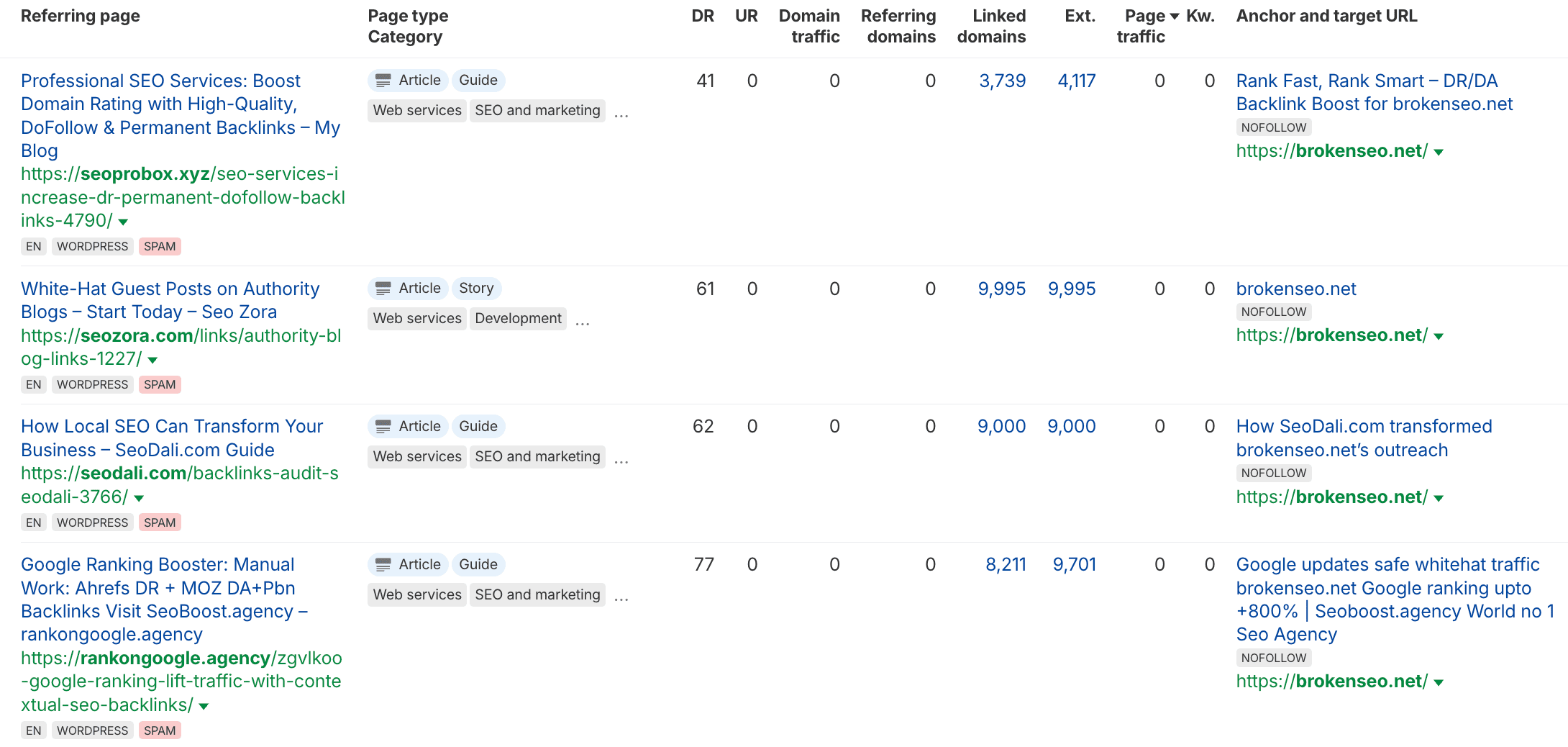
So, should you disavow them?
From my experience: if there aren’t many of them (for me, up to 100–200 unique ref domains like this, even if your site only has 50–100 natural links), you can ignore them. Google generally understands what these links are and often just doesn’t count them.
If the volume suddenly becomes massive (it happens), you can disavow them for peace of mind. Real damage is uncommon. Mostly they just force you to add another filter in Ahrefs when analyzing backlink profiles. Yes, you’ll see tons of these not only on your site, but on competitors too.
“Gift” Links From Your Competitors
This is common in competitive niches (I’ve seen it more than once): competitors point BAD links at your site. Usually this means anchors that are negative and/or relate to “gray” niches, such as:
Adult anchors (escort/porn-related)
Pharmacy anchors (e.g., potency pills or enlargement)
How harmful are they? It depends on volume and indexation.
If there aren’t many, or if Google doesn’t index most of them, they may do nothing. The “harm threshold” is not a fixed number you can rely on.
If these links do have an effect, you may see:
The indexed ones show up in Google Search Console under Links (and sometimes it won’t even get to step 2)
Your site starts ranking for those toxic anchors
In both cases, disavow should be used as soon as possible. You’re signaling to Google: PLEASE don’t use these links to evaluate or rank my site.
301-Glued Domains Pointing at Your Site
This is similar to competitor spam links, but more aggressive: someone “glues” a bad site to your site via a 301/308 redirect or a canonical, usually targeting your homepage or a money page you compete on. The toxic site often comes from the same niches mentioned above, and its anchor profile can effectively “transfer” to you.
In this case, disavowing doesn’t always help (and it’s never guaranteed anyway), but you should still do it 1000%.
How to Disavow Links (The Actual Process)
Disavowing links is simple:
You need access to the website property in Google Search Console
Open the Disavow tool: https://search.google.com/search-console/disavow-links
Select the correct property (domain/property)
Upload a .txt file (other formats aren’t supported)
You can disavow individual URLs or entire domains. I usually disavow at the domain level after a quick check that the domain is not going to bring anything useful. If more spam appears from that domain later, it’s already covered.
Disavow File Syntax
Rules:
Each URL goes on a new line
To disavow a whole domain, use domain: before the domain name
Optional comments are allowed if the line starts with # (Google ignores them)
Limits:
Maximum URL length: 2,048 characters
Maximum file size: 100,000 lines (including blank lines and comments) and 2MB
If something is wrong with formatting, Google will warn you during upload and reject the file.
For some sites, disavowing can become routine (for example, when competitor spam keeps coming in: some links get indexed faster, others later). In that case, you just upload an updated file, no need to delete the old one.
If you lost your old disavow file, you can download the current version from the Disavow tool - no worries.
How Fast Does Google Apply a Disavow?
Google is known for its speed issues (in SEO terms, this usually shows up as indexing delays — that “small indie company” doesn’t like spending money on its own crawl budget and on how quickly data refreshes in Google Search Console).
With link disavows it’s the same story: it’s basically luck of the draw. Sometimes links get discounted fast, sometimes they don’t. According to Google’s help documentation, the process can take up to a few weeks, because Google needs to recrawl each of the reported URLs.
How Do You Know Google Really Ignored the Links?
You basically don’t.
If your site was hit hard by toxic links, and the disavow is effective, you might see recovery over time. Or you might not.
Google does not provide a clear “success” message that your disavow file made the world a better place. And yes — disavowed links will still show up in the Links report in GSC even after they’ve been successfully disavowed.
Hope my guide was helpful. Peace and good luck with your links.