Hi, I’m Alex. Here you’ll learn why SEO is broken — and how hacked sites used for SEO manipulation are one of the reasons.
Hacked sites in SEO are literally hacked websites where external links get placed without the owner’s knowledge. You’ll also see this under the nickname “pies”.
This is a black hat SEO promotion method.
The vast majority of these sites run on WordPress — the most popular CMS in the world — and it has its fair share of vulnerabilities, which makes it easier for attackers to get into your site.
How does it look in practice?
Hackers — or more accurately, the buyers of a “slice of pie” — choose what kind of link they want placed on the hacked site. Common patterns:
A new content page is created on the site, usually with a text anchor or an image link.
The link is placed on a specific page the buyer cares about.
The link is placed in a sitewide block, most often the footer.
In cases 2 and 3, links are usually made invisible: it can be a 1px element, a transparent image, “near-anchor” text hidden via JavaScript, etc. It all depends on the hackers’ creativity.
How to protect yourself
I’ve already mentioned that most hacks target WordPress sites, so I’ll focus on WP — but the same logic applies to other CMSs too.
Keep WordPress itself updated. A lot of WP updates are specifically about patching known vulnerabilities, so hacked victims are often sites that haven’t updated WP in months/years/etc.
Keep your active plugins updated, and delete the ones you don’t use. Same idea as with the CMS: developers patch bugs and security holes all the time, especially in widely used plugins like Yoast SEO, RankMath, and others.
Use protection against password bruteforce and other attacks: Cloudflare or analogs. The most common WP username is “admin”, so attackers often only need to brute the password. So: don’t use weak passwords. One of the best anti-bruteforce moves is changing your admin login URL (default is /wp-admin/).
My plugin picks for basic WP security
Change admin login page: All In One Login
Bruteforce protection: Limit Login Attempts Reloaded
Automated backups: UpdraftPlus
Disables XML-RPC API vulnerability: Disable XML-RPC
Note: before updating plugins — especially doing batch updates — I strongly recommend making a backup first, or setting up a plugin (hehe) that does automated backups on a schedule.
Why? Not every plugin behaves after an update. Plugins can conflict, devs can deploy a half-baked release, or push an update with a bug, etc.
Example of how hackers try to access my site
Below, I’ll show you how hackers try to access my website (unsuccessfully — cause it runs on Next.js) — all in 24 hours. But you can clearly see the typical PHP endpoints they probe when attacking WordPress sites. In my case, the requests were blocked at the CDN level, so I strongly recommend using a CDN with solid protection like Cloudflare. It has a free plan, it’s easy to set up, and it works for almost any website.
Below you can see a small sample of where these attempts are coming from (or at least where the IPs are registered), along with a bit more info:
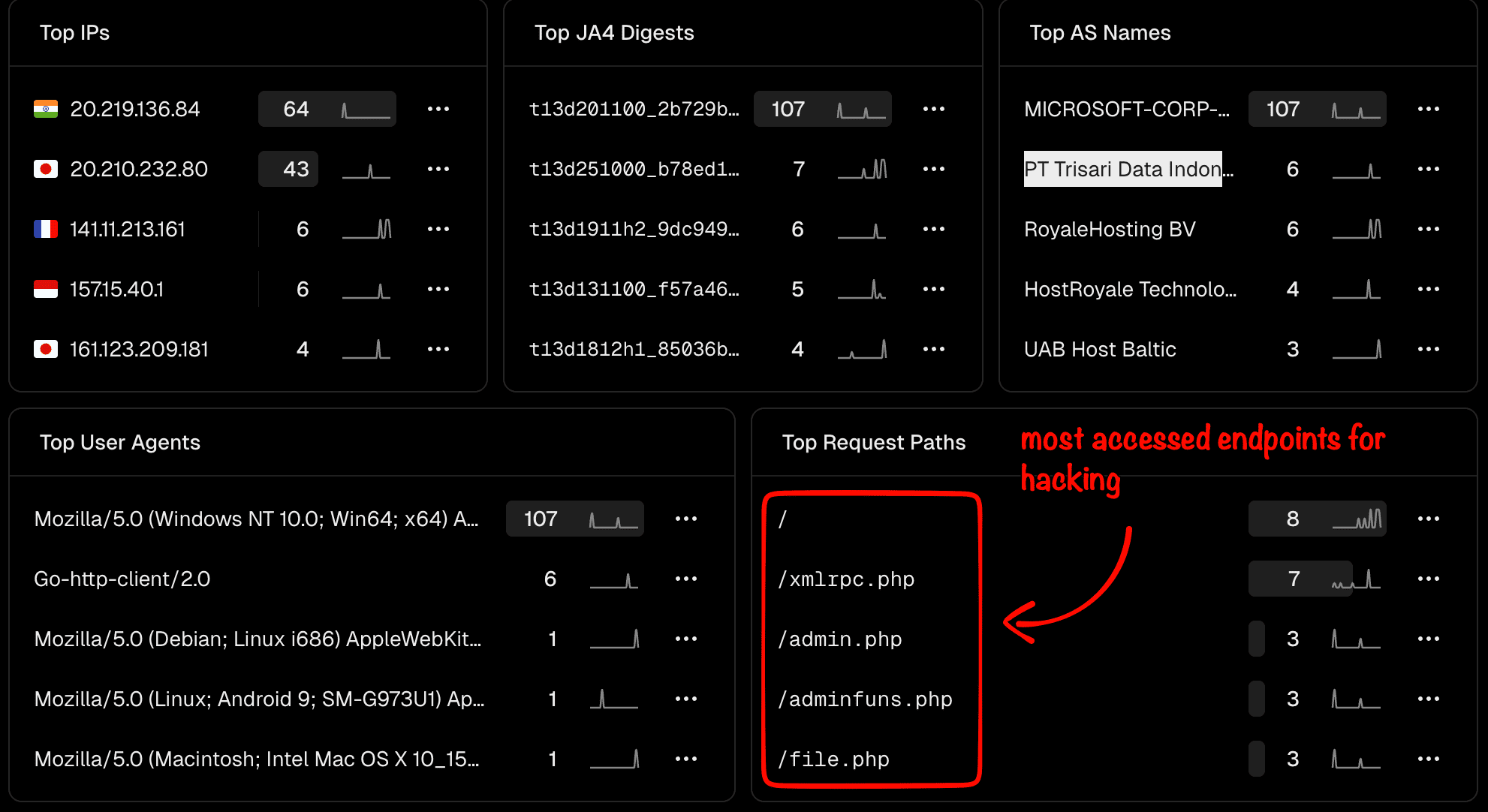
The most commonly targeted paths by hackers I see are:
/xmlrpc.php
/admin.php
/adminfuns.php
/file.php
/wp-login.php
But there are many more. I’m listing most of them below just FYI, so you know what to expect:
I’ll update this later once I’ve gathered more up-to-date data.
Also, I looked into the Russian IP that showed up here — it seems to be linked to a known hacking group.
Interesting read about it here: https://thehackernews.com/2025/04/hackers-abuse-russian-bulletproof-host.html
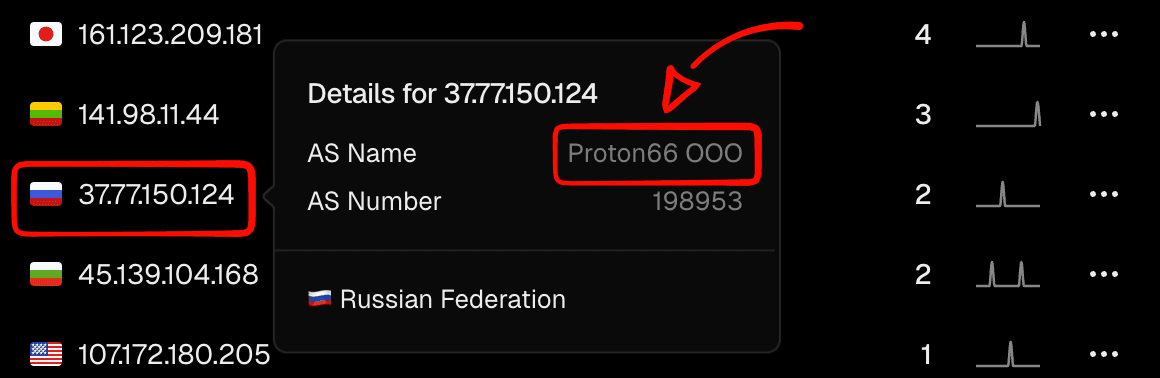
I'll quote: "Another notable activity concerns the use of compromised WordPress websites related to the Proton66-linked IP address "91.212.166[.]21" to redirect Android device users to phishing pages that mimic Google Play app listings and trick users into downloading malicious APK files."
So be careful — and make sure your website security basics are in place.
How to detect someone else’s links on your site
There are a bunch of ways — depending on what you have in your toolbox. Here are the main ones that come to mind:
Crawl the site with Screaming Frog (or analogs) — look at External Links
Check the site with external crawlers like Ahrefs, Semrush, etc. — again, External / Outgoing links
Manually inspect page source code for alien content and links
Use a bookmarklet that extracts all links from a page (not a silver bullet — it may not detect links that are injected or rendered via JavaScript.)
Why hacked sites are used for SEO
Using hacked sites is still link building — just black-hat link building. And links are still one of Google’s core ranking factors (source 1, source 2).
Don’t forget: hacking websites is a crime and is criminally punishable in most parts of the world.
This is mostly used in highly competitive grey/black niches: adult, CBD, gambling, pharmacy (viagra, steroids, etc.), payday loans, and other markets where the stakes are high. Players in these niches usually don’t care about reputation and often have budgets big enough to buy (or abuse) basically any type of links.